

Update – 15th Sept ’23. Thankyou to the folks at Postman for quoting my blog in their latest article about Postbot.

Now then testers, quality engineers and generally inquisitive folks! I’ve had a sneak peak at the new AI bot Postman have been working on in their canary version – you can apply for the beta yourself here if you want to follow along and take a look. In my usual style, I thought I’d drop 5 handy ways you can use it at work, if you use Postman for your testing already. It can’t replace you and your fabulous testing brain, but it can help with formulating your assertions and getting your idea from in your head to a working script.
Postman have dipped their toes into the AI world already with Flows, in a pretty unannounced feature called AI assistant, that you can use to write FQL (Flows Query Language).
However, now OpenAI integration has made its way into… dah dah dah…. the tests tab! 💻

Thats right – the snippets side bar has a new friend 🫂
TLDR: Remember when you first discovered snippets and your jaw kinda dropped at how much time it was going to save you? You ain’t seen nothing yet.🔥
From my first thoughts, this could quickly become a habitual way of writing tests in Postman. It is very easy to use, and generally speaking, very good at coming up with the right syntax. Most (90% or so, depending on complexity) of my Postbot generated code was what I wanted, and worked first time. Gamechanger territory my friends, especially to those of us to whom code takes time to write, with a lot of Googling and tweaking involved.
1. Ask Postbot to write tests for you
Using the prompts within Postbot, you can ask it to auto-generate tests for you. You won’t know the logic behind them, but you can see if they generate you anything useful, and get rid of the trash. In this instance, I sent the GET/Pokemon API, then clicked Postbot’s prompt. Several tests were generated, including the old faithful status code check, alongside more specific checks for relevant content. A few things that I like:-
- It nests assertions within the same test, rather than a separate test for each
- It labels each test with a useful name – something that I often forget to do in copy/paste land to my detriment come debug time!
- It checks security as well as functional areas (content of array responses)
A few words of caution though – when playing with this I did notice that sometimes incorrect syntax was generated (e.g. if you already had a test and the cursor was placed inside it when Postbot was asked a question). It also ignores any existing tests – so if you already have status code == 200 checks then be prepared for some dupes!
2. Ask Postbot to write you a custom test
There will always be cases where the AI isn’t intelligent enough to ready your mind and come up with the exact scenario you were thinking of. So before you start writing the code, why don’t you see if you can ask it for what you want. I was pleasantly surprised by how complex prompts were understood.
3. Tweak a custom test
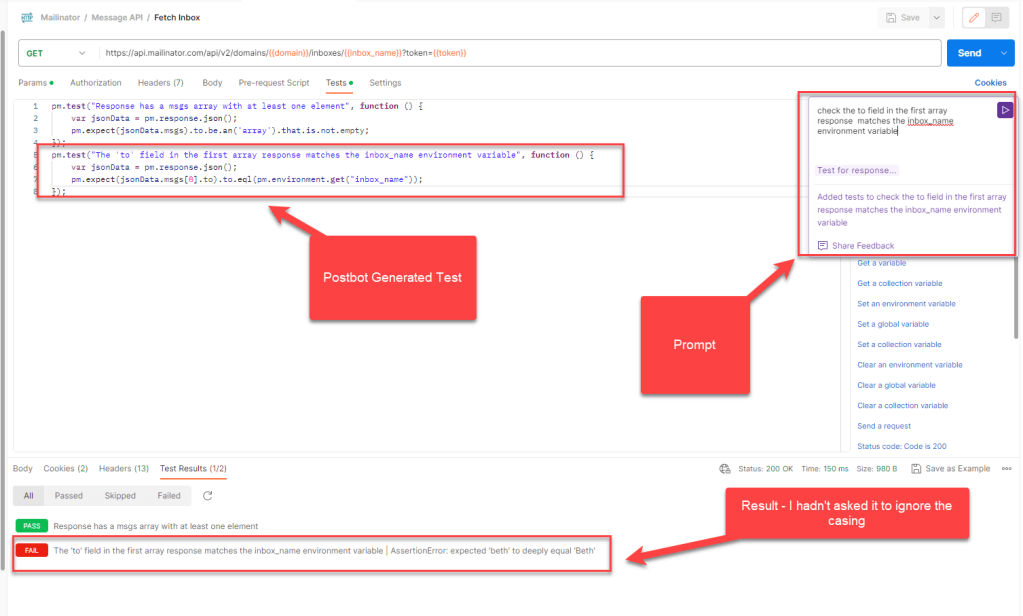
If you used ChatGPT before the prompts were remembered, you know how painful this was. Luckily, Postbot stores your last request, and allows you to adapt it based on what you need. e.g. From “get the value” to nah, actually, “get the value in the first array response”. or actually, I wanted it to ignore the casing of the environment variable, that’s giving me a false negative”. Just open up the prompt again, tweak it and it updates the test – nice!
So go from this…
To this…
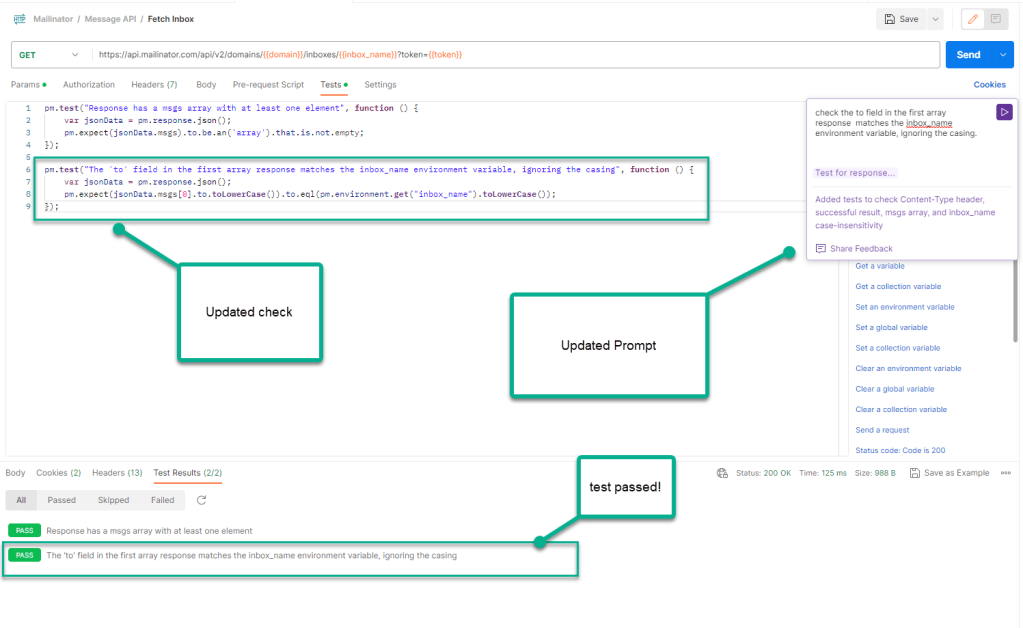
Again, a note of caution. Sometimes Postbot tries to be extra helpful when tweaking, and inserts brand new tests that you haven’t actually asked for. Sure this will improve over time, but be mindful of the before and after.
4. Ask Postbot to store response values as variables
You can use the set and get variable snippets for this, but if you want to ask Postbot to do this as part of a test you can.

Note – Postbot’s mission in life seems to be around generating tests atm, so if you’d prefer this to be a non-test then use the code snippets instead. Handy add-in to tweak for an ai generated test if testing workflows for example.
5. Visualize Response Data
So I’ve pretty much given up on visualizer as a feature, because writing the code to configure it was so tricky. However, the auto prompts in Postbot work a treat.
In this example, I use the Mailinator Stats API, and ask Postbot to generate a bar graph of the results. Et voila!

When I tried to create the prompt myself, the code didn’t work properly, but Postman seem to have trained Postbot to come up with the goods when the prompts are selected e.g. Visualise Respose… as a table. Then select the body tab, click Visualize button. This could be genuinely helpful.
To sum it all up…
Of course, treat this and all other AI with caution, review what it tells you and make sure you’re not overdoing it #sustainability. Finally, using a feature like this means it is more important than ever to TEST THE TESTS! Before you blindly rely on them, make them intentionally fail, so you know if you need them to in future they will.
Even in its infancy, with some finesse to do, Postbot is still a mighty feature. Definitely for new and experienced Postman users alike something worth having in your toolkit. It isn’t a replacement for an experienced tester, who can assess nuance, applicability and sustainability. But its a pretty blinking decent assistant. Good job Postman
 Beth The Tester's Tales
2 thoughts on “5 Ways Postman’s Postbot AI Can Help Your Testing”